
How to Rate Your Outfit With AI: Fit Check Guide
Published · Updated
Can AI rate your outfit?
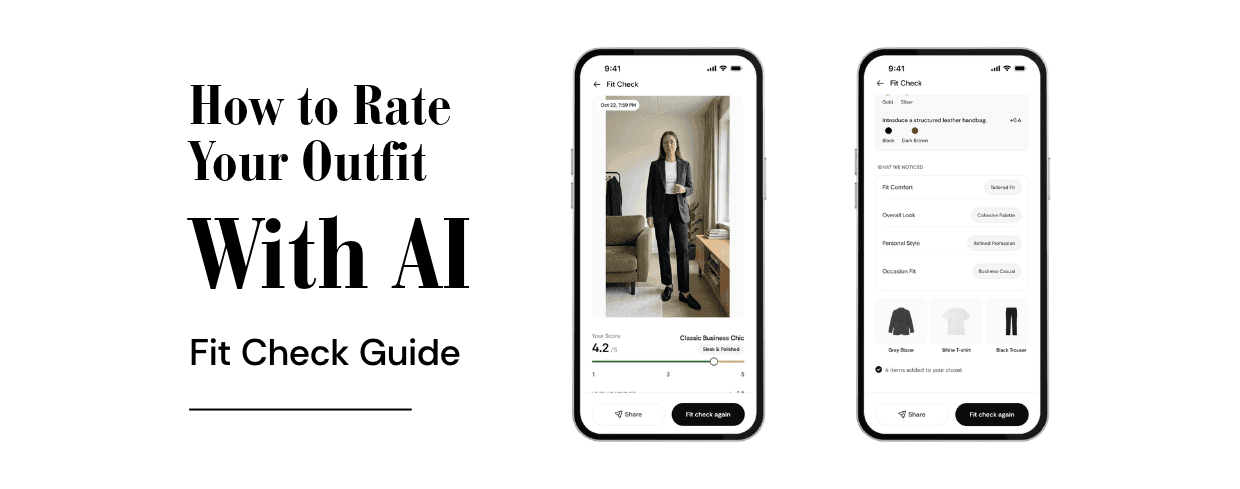
Quick answer: Yes. AI outfit rating apps analyse a photo of what you are wearing and give feedback on colour, balance and how well the pieces work together. In BeSpoke AI Stylist, Fit Check rates your outfit from a single photo and adds the items it recognises to your Closet as clean flat lays.
We have all asked a friend, "Does this look okay?" before heading out. Sometimes the friend is busy, sometimes they are too polite, and sometimes you are getting dressed alone at 7 a.m. An AI outfit rating gives you a second opinion instantly, whenever you want one.
What is a Fit Check?
"Fit check" started as social media slang for showing off your outfit, usually in a mirror selfie or a short video. "Fit" is short for outfit. Now the phrase also describes asking for feedback on what you are wearing before you go out.
Fit Check in BeSpoke AI Stylist turns that into a feature: you share a photo of your outfit and get an instant rating with suggestions, instead of waiting for likes or replies.
How to use Fit Check in BeSpoke AI Stylist
- Open Fit Check in the BeSpoke AI Stylist app.
- Take or upload a photo of your full outfit.
- Get your rating along with suggestions to improve the look.
- Find your items in Closet. Fit Check recognises the pieces you are wearing and adds them to your Closet as clean flat lays, so your digital wardrobe grows every time you use it.
That last step is what makes Fit Check different from simply asking for an opinion. Building a digital wardrobe usually means photographing every item one by one. With Fit Check, getting dressed does the work for you.
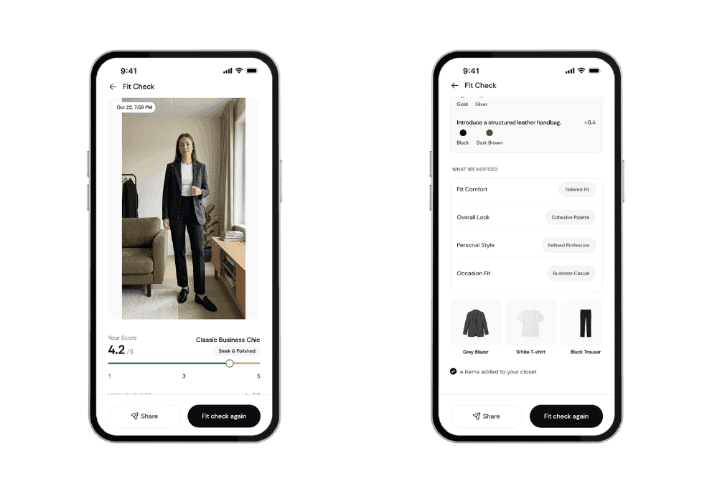
BeSpoke AI Stylist Fit Check rating an outfit and adding items to Closet
How to take a good outfit photo
The better the photo, the more useful the feedback.
- Show the whole outfit. Include your shoes. Use a full-length mirror or prop your phone up and use the timer.
- Use natural light. Stand facing a window. Avoid strong light behind you, which turns you into a silhouette.
- Choose a plain background. A clear wall or door helps the AI pick out each piece.
- Stand naturally. Face the camera with your arms slightly away from your body so each item is visible.
- Keep the camera at chest height. Shooting from very high or low distorts proportions.
- Take off bags and coats unless they are part of the look you want rated.
How to act on your rating
A rating is only useful if you know what to do next.
- High rating: you are good to go. Save the outfit so you can find it again.
- Middle rating: read the suggestions and change one piece, usually the shoes or a layer. Small changes make the biggest difference.
- Low rating: keep the piece you love most and rebuild around it. The problem is usually how pieces work together, not the pieces themselves.
Try rating two versions of the same outfit, such as trainers versus boots, or a blazer versus a cardigan. Comparing two photos is one of the quickest ways to learn what works on you.
When to use Fit Check
- Before an important event, such as an interview, a date, a wedding or a party.
- When you are trying something new, like a colour or shape you do not usually wear.
- When you are building your Closet, since every Fit Check adds pieces automatically.
- Before buying something, to see whether a new item works with what you own.
What AI can't judge (yet)
AI outfit ratings are a helpful second opinion, not the final word.
- It sees, but cannot feel. AI judges colour, shape and balance, but not fabric comfort or how a garment feels to wear.
- Fit is hard to read from a photo. Tailoring issues, like sleeves that are slightly too long, may not show.
- Context matters. Tell the app where you are going when you can, because the right outfit for a festival is different from the right one for a boardroom.
- Your taste wins. If you love an outfit and feel confident in it, that matters more than any score.
Fit Check and AI outfit rating FAQs
Can AI rate my outfit? Yes. AI outfit rating apps analyse a photo of your outfit and give feedback on colour, balance and how well the pieces work together.
What is a fit check? A fit check is a quick look at, or request for feedback on, your outfit. In BeSpoke AI Stylist, Fit Check is a feature that rates your outfit from a photo.
Is there an app that rates outfits? Yes. BeSpoke AI Stylist's Fit Check rates your outfit from one photo and also adds the items to your digital Closet.
How accurate is an AI outfit rating? It is a useful second opinion on colour, proportion and balance, but it cannot feel fabric or fully judge tailoring. Your own comfort and confidence still matter most.
Do I need to photograph every item separately? No. Fit Check recognises the pieces in one outfit photo and adds them to your Closet as flat lays.
Are my outfit photos private? Check the BeSpoke AI Stylist privacy policy for exactly how photos are stored and used.
Get a second opinion in seconds
An AI fit check gives you honest, instant feedback before you walk out of the door, and it builds your digital wardrobe while you get dressed. Take a clear full-length photo, read the suggestions, change one piece if you need to, and go.
Try Fit Check today. Download BeSpoke AI Stylist on the App Store or get it on Google Play.
Ready to upgrade your style game? Download BeSpoke AI Stylist and let your AI stylist take it from here.

Author
Neeraj Bansal